Intense attention and an everyday obsession with photography is what drove the late Richard Avedon in capturing some of the most interesting and provocative personalities in his portraiture works.
In this video, photographer Richard Avedon speaks with Charlie Rose dating from 1993 through 1999. He discusses how a visual sense and a total concentration of his subjects were always so critical to his success. It is soon apparent how articulate and attentive Avedon is in these segments and how special he really was, not only as a photographer but as an intellect as well.
I discovered some new and interesting ideas in this video interview to be informative and thought provoking. Here you have view two top professional in a fun tribute to one of America's greatest photographers!
**********************************************************************************
If a day goes by without my doing something related to photography, it's as though I've neglected something essential to my existence, as though I had forgotten to wake up.
A portrait is not a likeness. The moment an emotion or fact is transformed into a photograph it is no longer a fact but an opinion. There is no such thing as inaccuracy in a photograph. All photographs are accurate. None of them is the truth.
I don't really remember the day when I stood behind my camera with Henry Kissinger on the other side. I am sure he doesn't remember it either. But this photograph is here now to prove that no amount of kindness on my part could make this photograph mean exactly what he.. or even I.. wanted it to mean. It's a reminder of the wonder and terror that is a photograph.
A photographic portrait is a picture of someone who knows he's being photographed, and what he does with this knowledge is as much a part of the photograph as what he's wearing or how he looks. He's implicated in what's happening, and he has a certain real power over the result.
A portrait photographer depends upon another person to complete his picture. The subject imagined, which in a sense is me, must be discovered in someone else willing to take part in a fiction he cannot possibly know about.
Photography has always reminded me of the second child.. trying to prove itself. The fact that it wasn’t really considered an art.. that it was considered a craft.. has trapped almost every serious photographer.
I know that the accident of my being a photographer has made my life possible.
~Richard Avedon 1923 - 2004
*********************************************************************************
A special thanks to Aline at Lenscratch for her recent post!
Friday, August 28, 2009
Thursday, July 9, 2009
One step at a time
Photographers who haven't heard of photo.net and their help forums, I would recommend this site! You will have access to currently 38 photography forums with more than 3,000 new posts added daily including great tips on a wide variety of topics and also post your images for a critical review from some very talented photographers.

Tuesday, June 30, 2009
What's one more image!?
Recently I came across an interesting statistic regarding the voluminous number of pictures uploaded to the top image warehouses across the web.
ImageShack appears to be in the lead with a reported 20 billion images, followed by Facebook with over 15 billion, Photobucket 7 billion and Flickr with over 3 billion. Who can comprehend such numbers as these??
I know statistics never lie, only reporters of statistics do, but I have no reason to doubt these figures. I researched several sites and found only a relatively small percentage difference in all the data, plus or minus a few hundred million.
With all the images to be viewed, one must certainly be discriminating when going through all of the selections we have at our fingertips.
I enjoy viewing photographer's images marked as "Favorites", both on Flickr and JPG magazine. You can discover some of the most interesting works under this topic. I believe the images photographers select as "favorites" helps in filtering through this selection process for a shortcut in time management.
"StumbleUpon" is also a good filter in helping to find the very best in high quality digital images on the web. You make category selections and "Stumble Thru" your way in discovering some of the most fantastic photography!
“Your photography is a record of your living, for anyone who really sees.” ~Paul Strand
ImageShack appears to be in the lead with a reported 20 billion images, followed by Facebook with over 15 billion, Photobucket 7 billion and Flickr with over 3 billion. Who can comprehend such numbers as these??
I know statistics never lie, only reporters of statistics do, but I have no reason to doubt these figures. I researched several sites and found only a relatively small percentage difference in all the data, plus or minus a few hundred million.
With all the images to be viewed, one must certainly be discriminating when going through all of the selections we have at our fingertips.
I enjoy viewing photographer's images marked as "Favorites", both on Flickr and JPG magazine. You can discover some of the most interesting works under this topic. I believe the images photographers select as "favorites" helps in filtering through this selection process for a shortcut in time management.
"StumbleUpon" is also a good filter in helping to find the very best in high quality digital images on the web. You make category selections and "Stumble Thru" your way in discovering some of the most fantastic photography!
“Your photography is a record of your living, for anyone who really sees.” ~Paul Strand
Wednesday, June 17, 2009
You've Got Mail!
Just last week, a little passed midnight on June 11, after logging in to my JPG account, I realized there was something odd and peculiar looking about the site's interface. Whenever I made a comment on any of my contact's images, it appeared as if the photographer of that image had made the comment, including their user name and icon. As it was later discovered, read and write permissions were inadvertently made available to all users who were logged on during this brief time period.
JPG Magazine is one of my favorite online photo sharing sites which I've had the privilege of having my work published, both in their online and print media, but this breach is scary. Devin Hayes of JPG recently blogged about the hard drive on the application server going bad and also mentions about a "fairly critical bug in the server configuration that allowed a user to view another users messages."
To be fair, this can happen on any server and has happened to the best of them. The lesson learned is to remember every email and comment you make online, regardless of the site, can become public information. My advice to any one concerned is to delete personal email in your inboxes that you deem private or would not want to share outside of the sender and yourself. If the messages are important enough you can always print and hard file the old fashion way.
*************************************************************************
I came across this YouTube lecture between Google authors and internationally famed photographer "Joe McNally." It's much more than a video clip, extending an hour and 10 minutes, but if you have the time I'm sure you will discover something new and exciting and maybe inspirational from one of America's top shooters!
“There are no rules and regulations for perfect composition. If there were we would be able to put all the information into a computer and would come out with a masterpiece."

Shot at the Ronnie Van Zant Park in Lake Asbury, Fl
We know that's impossible. You have to compose by the seat of your pants.” ~ Arnold Newman
JPG Magazine is one of my favorite online photo sharing sites which I've had the privilege of having my work published, both in their online and print media, but this breach is scary. Devin Hayes of JPG recently blogged about the hard drive on the application server going bad and also mentions about a "fairly critical bug in the server configuration that allowed a user to view another users messages."
To be fair, this can happen on any server and has happened to the best of them. The lesson learned is to remember every email and comment you make online, regardless of the site, can become public information. My advice to any one concerned is to delete personal email in your inboxes that you deem private or would not want to share outside of the sender and yourself. If the messages are important enough you can always print and hard file the old fashion way.
*************************************************************************
I came across this YouTube lecture between Google authors and internationally famed photographer "Joe McNally." It's much more than a video clip, extending an hour and 10 minutes, but if you have the time I'm sure you will discover something new and exciting and maybe inspirational from one of America's top shooters!
“There are no rules and regulations for perfect composition. If there were we would be able to put all the information into a computer and would come out with a masterpiece."
We know that's impossible. You have to compose by the seat of your pants.” ~ Arnold Newman
Wednesday, June 3, 2009
Ansel Adams and PS Calculations
In 1966 while I was in the 5th grade, I recall a weekly current events assignment I read to my classmates on Ansel Adams. Our school was quite advanced for the day, relative to the other government schools in my area.
We enjoyed a typing class, which I was the only boy in the room, a chess class, a cool science room where we watched films on the universe including "Mr. Sun" and his cartoons on the dilation of time, and last but not least, my favorite, a once a week hour on photography!
About 3 years ago I shredded my first black and white prints from this early time period of my life while "weeding" out a closet. I don't know what I was thinking and it is quite regretful every time I think about it.

For those photographers new to Photoshop, there is a built in "Ansel Adams" tool. Well it's not really called that, but it is amazing the AA look and feel you can attain by using "Calculations" located under the "Image" tab.
There are many different options you can play with and can start by changing channels and blending modes. A much greater range in depth of creativity and some cool effects can be accomplished by using the Calculations tool, much more than by just removing the saturation out of a color image! Warning: This can be addictive. :)
A dear photographer friend sent me this Ansel Adams YouTube video. A soft spoken and brilliant minded photographer in his own few words shortly before his death. Thank you Laurie!
We must remember that a photograph can hold just as much as we put into it, and no one has ever approached the full possibilities of the medium.
~Ansel Adams
We enjoyed a typing class, which I was the only boy in the room, a chess class, a cool science room where we watched films on the universe including "Mr. Sun" and his cartoons on the dilation of time, and last but not least, my favorite, a once a week hour on photography!
About 3 years ago I shredded my first black and white prints from this early time period of my life while "weeding" out a closet. I don't know what I was thinking and it is quite regretful every time I think about it.
For those photographers new to Photoshop, there is a built in "Ansel Adams" tool. Well it's not really called that, but it is amazing the AA look and feel you can attain by using "Calculations" located under the "Image" tab.
There are many different options you can play with and can start by changing channels and blending modes. A much greater range in depth of creativity and some cool effects can be accomplished by using the Calculations tool, much more than by just removing the saturation out of a color image! Warning: This can be addictive. :)
A dear photographer friend sent me this Ansel Adams YouTube video. A soft spoken and brilliant minded photographer in his own few words shortly before his death. Thank you Laurie!
We must remember that a photograph can hold just as much as we put into it, and no one has ever approached the full possibilities of the medium.
~Ansel Adams
Wednesday, May 20, 2009
Photomontage using the Clone Stamp
Creating a Photomontage in Photoshop is fun and easy using the Clone Stamp tool.
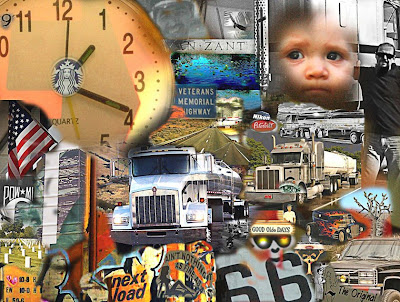
This collage was created using multiple images I have taken over the past several years using only the Clone Stamp tool in Photoshop.
I have discovered several different composite methods but have found the Clone Stamp tool works the best for me. After choosing a theme, I searched my archives for images that matched that idea and added all those files to a working folder.
I began with a new canvas on black and added my first subject near the center of the frame. It then became a processed that evolved around the"Highway Scene" with a continuous focus on images I took between the years 2006-2008.
To select the Clone Stamp in Photoshop press the "S" key. Open up an image that you would like to clone from and choose the desired brush size. Simply hold down the "Alt" key and click on the selection you want to copy. Return to your blank canvas and start drawing while holding your mouse button down. That's all there is to it!
A photographer is at a dinner party, the guests are looking through his portfolio. The host comments, "These pictures are wonderful! You must have a great camera!"
Photographer replies, "Thanks. This dinner is delicious. You must have really great pots..."
~Author Unknown

This collage was created using multiple images I have taken over the past several years using only the Clone Stamp tool in Photoshop.
I have discovered several different composite methods but have found the Clone Stamp tool works the best for me. After choosing a theme, I searched my archives for images that matched that idea and added all those files to a working folder.
I began with a new canvas on black and added my first subject near the center of the frame. It then became a processed that evolved around the"Highway Scene" with a continuous focus on images I took between the years 2006-2008.
To select the Clone Stamp in Photoshop press the "S" key. Open up an image that you would like to clone from and choose the desired brush size. Simply hold down the "Alt" key and click on the selection you want to copy. Return to your blank canvas and start drawing while holding your mouse button down. That's all there is to it!
A photographer is at a dinner party, the guests are looking through his portfolio. The host comments, "These pictures are wonderful! You must have a great camera!"
Photographer replies, "Thanks. This dinner is delicious. You must have really great pots..."
~Author Unknown
Saturday, May 9, 2009
Digital art using the clone stamp tool
Recently I was sorting through a large inactive archive I periodically review in the process to maintain a manageable number of images. I remember when I could fit all my work on one CD. :)
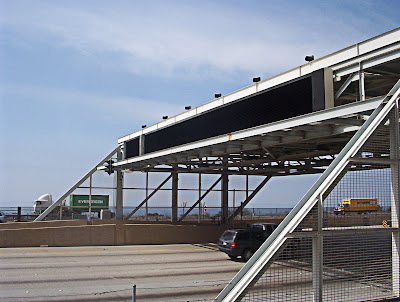
The first picture below was taken while driving down the freeway in Los Angeles. I was drawn to the shape and design of this structure. The angles and the black bridge had an aesthetic appeal, but the image was incomplete and was buried in my "trash" archive.
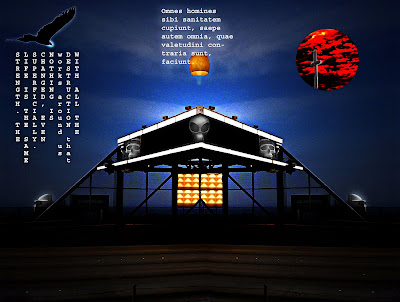
This second image was created from the above, using only a few tools and several images from other shots I took, using the "Clone Stamp tool" in Photoshop. Listed below are the steps I used.
The first picture below was taken while driving down the freeway in Los Angeles. I was drawn to the shape and design of this structure. The angles and the black bridge had an aesthetic appeal, but the image was incomplete and was buried in my "trash" archive.
This second image was created from the above, using only a few tools and several images from other shots I took, using the "Clone Stamp tool" in Photoshop. Listed below are the steps I used.
- Create a copy of the original file and rename this file
- Rotate and flip the canvas to the horizontal position
- Using the Move tool drop the copy image on top of the original
- Add a Layer mask
- Use the Gradient tool to align the 2 opposite images to appear as one
- Merge the layers and save
- Open up an image you would like to add a selection to the saved image
- Select the "Clone Stamp tool" and place your cursor on the desired selection holding down the alt tab and single click
- Move back to the original and hold down the mouse button over the area you wish to apply the clone
- Try different brush settings starting off small until you get the right size. For this image I used a Normal and Vivid mode with Opacity set at 100% and a Flow of the same.
Subscribe to:
Posts (Atom)